Unicode Text Converter: Debugging Garbled Characters & Encoding Issues
Ever encountered a string of text that looks like it's been put through a blender? Characters like "ü", "Ã", or "è" appearing instead of the expected "ü", "ñ", or "è"? This common and frustrating phenomenon, often dubbed "mojibake" or garbled text, is a tell-tale sign of a character encoding mismatch. In our increasingly globalized digital landscape, understanding and resolving these issues is paramount, and a robust Unicode text converter is your essential ally. This article will dive into the heart of these encoding dilemmas, explaining why they occur, and how a dedicated Unicode tool can help you swiftly debug and rectify them, ensuring your ã‚ャラクター コード (character code) is always interpreted correctly.
What Causes Garbled Characters? The Root of Encoding Nightmares
The core problem behind garbled characters stems from a simple yet pervasive issue: a system attempting to interpret text using the wrong ã‚ャラクター コード. Imagine sending a message written in a complex cipher, but the recipient tries to decode it with an entirely different key. The result isn't just meaningless; it's a jumble of incorrect symbols. This is precisely what happens when text encoded in, say, UTF-8, is mistakenly read as if it were in ISO-8859-1 or Windows-1252.
For instance, a character like "è" (e-grave), when encoded in UTF-8, is represented by two bytes: C3 A8 (hexadecimal). If a system incorrectly assumes this sequence is ISO-8859-1, it will interpret C3 as "Ã" and A8 as "¨", leading to the infamous "è". This isn't a problem with Unicode itself, but rather a miscommunication about the specific Unicode encoding (like UTF-8) being used. Common culprits for these encoding mismatches include:
- Mismatched Headers: A web server might deliver a page with UTF-8 content but declare its `charset` in the HTTP header as ISO-8859-1. The browser, trusting the header, then misinterprets the byte stream.
- Database Woes: Text stored in a database with one encoding (e.g., Latin-1) is later retrieved by an application expecting another (e.g., UTF-8).
- Copy-Paste Errors: Copying text from an application that uses one default encoding (e.g., an older text editor) and pasting it into another that uses a different one (e.g., a modern browser or IDE).
- API and JSON Payloads: Data transmitted via APIs or embedded in JSON objects can have improperly escaped or encoded characters, especially when dealing with non-ASCII symbols.
- Missing BOMs or Mixed Line Endings: Subtle issues like a missing Byte Order Mark (BOM) in UTF-8 files or inconsistent newline characters can also confuse parsers, leading to unexpected character displays.
Understanding these underlying causes is the first step to debugging. The next is having the right tools to inspect the true nature of your ã‚ャラクター コード.
The Power of a Unicode Text Converter: Your Decoding Companion
A specialized Unicode text converter is an indispensable utility designed for practical encoding work. Unlike generic text editors or basic online lookup tools, it offers a comprehensive environment to:
- Translate Visible Text to Unicode and Back: Instantly convert human-readable characters into their underlying Unicode values (code points, hex values) and vice versa. This allows you to see the precise ã‚ャラクター コード for any character.
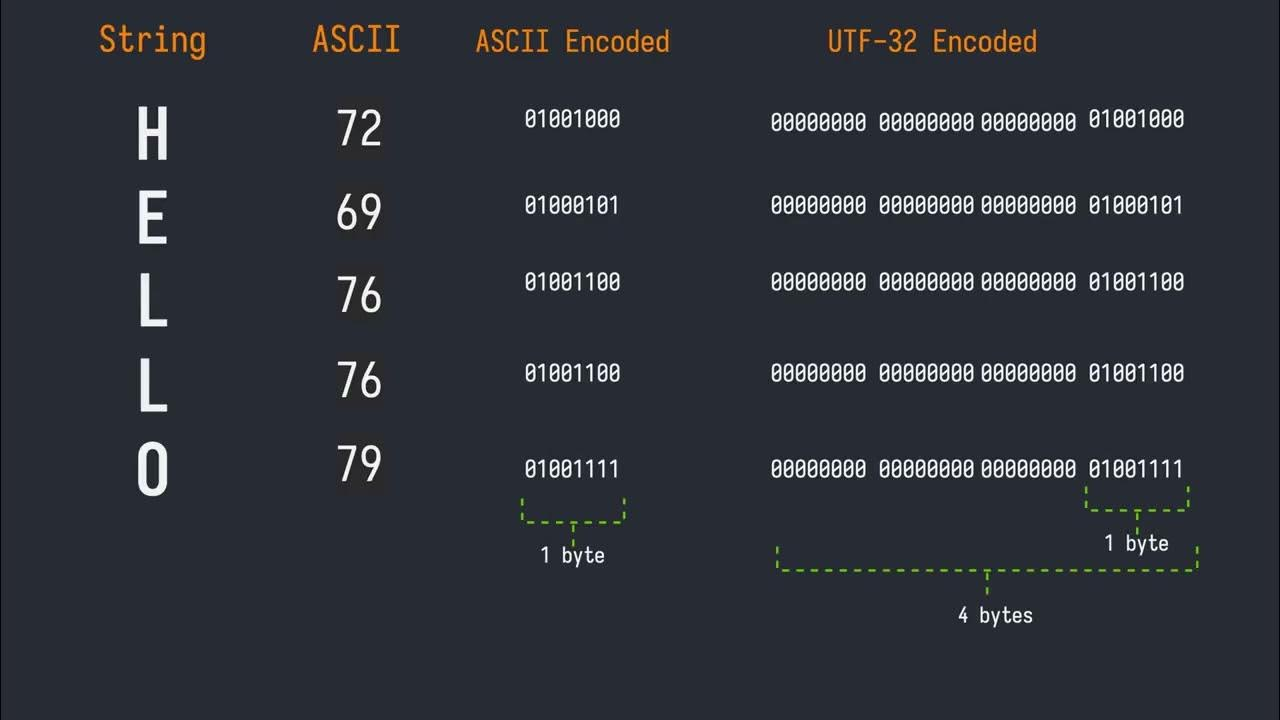
- Inspect UTF Representations: Examine how the same content is represented in different Unicode Transformation Formats: UTF-8, UTF-16, and UTF-32. This is critical for understanding byte sequences and debugging where misinterpretations occur. You can even compare how multilingual text, symbols, and emoji behave across these encodings. For deeper insights into these formats, refer to our article on Understanding Character Encodings: Compare UTF-8, UTF-16 & UTF-32.
- Handle Escapes and References: Easily convert between visible text, percent escapes (e.g., %20 for space), and numeric character references (e.g.,   or  ). This is particularly useful when dealing with data payloads, URLs, or HTML entities.
- Debug Complex Scenarios: It's built for troubleshooting broken copy/paste operations, validating escaped payloads from APIs, and resolving issues with mixed-format input where different parts of a string might adhere to different encoding rules.
Such a tool provides the answer to crucial questions like: "Is this really the character I think it is, or something subtly different?" or "Did the system store actual characters, their Unicode code points, or just raw encoded bytes?" It moves beyond a simple explainer, offering a robust platform for hands-on conversion and verification of every ã‚ャラクター コード.
Practical Applications: When and Why You Need This Tool
The utility of a Unicode text converter extends across various professional roles and common digital challenges. Here are several scenarios where it proves invaluable:
- For Developers: When debugging a string in code, especially one received from an external system. A JSON payload or API response often contains escaped values, and you need to quickly see the real characters behind them. It helps confirm whether text is stored correctly in databases or if byte sequences match expectations before processing.
- For Content and Localization Teams: Ensuring text, particularly multilingual content, is preserved correctly across different platforms, databases, or content management systems (CMS). It's vital to verify that special characters, accents, and unique scripts appear as intended, not as question marks or squares.
- For QA and Support Teams: When investigating user-reported issues about garbled text or incorrect symbols displayed on a website or application. This tool helps verify what was *actually* stored or transmitted versus what was *displayed*, pinpointing whether the problem lies in data storage, transmission, or rendering.
- For Web Designers and SEO Specialists: Moving between HTML entities, Unicode values, and normal text during cleanup or content migration. It's also excellent for validating web-facing text, ensuring that special characters in titles, descriptions, or content render correctly across various browsers and devices.
- For Data Engineers and Analysts: Confirming the exact content of strings before they enter data pipelines, logs, or markup. Misinterpretations of ã‚ャラクター コード early in the pipeline can lead to corrupted data downstream, causing significant analytical errors.
In essence, whenever you suspect a character isn't what it seems, or when data integrity relies on precise character representation, a Unicode text converter provides the definitive answer, helping you confidently manage every ã‚ャラクター コード.
How to Effectively Use a Unicode Text Converter for Debugging
Leveraging a Unicode text converter effectively involves a systematic approach to inspection and verification:
- Input Your Content: Begin by pasting the source text, character values, or Unicode-formatted content (e.g., € or \u20AC) into the converter's editor.
- Review Converted Output: The tool will instantly display the converted output, showing you the visible text, its Unicode code points, and its representation across different UTF encodings (UTF-8, UTF-16, UTF-32).
- Verify Against Expectations: Carefully check whether the output matches the expected character, byte sequence, or escape form. For instance, if you expect an em dash (—), ensure the tool confirms its code point (U+2014) and its UTF-8 byte sequence (E2 80 94).
- Utilize Specialized Views: If you're focused specifically on UTF-8 issues, some tools offer a narrower, UTF-8-only encoding/decoding view. This can be invaluable for confirming exact byte or code unit forms when troubleshooting common "mojibake" like "è". For a deeper dive into resolving such issues, explore our guide on Solve UTF-8 & Unicode Problems: Verify Characters Across Encodings.
- Perform a Round-Trip Sanity Check (Crucial!): This is arguably the most vital step. Convert your problematic text to its Unicode or UTF output, then immediately convert *that output back to text*. If the returned text is not identical to your original expected characters, you've pinpointed a problem. This could indicate a lost character, a mixed newline style (LF vs. CRLF), or a hidden Byte Order Mark (BOM) affecting interpretation. The round-trip reveals how robustly your characters are being handled through conversion processes.
By following these steps, you gain clear visibility into the precise ã‚ャラクター コード and its various representations, empowering you to debug with confidence.
Conclusion
In a world where digital communication transcends language barriers, the integrity of character encoding is paramount. Garbled characters are more than just an aesthetic annoyance; they signify a fundamental breakdown in how systems interpret our shared textual information. A dedicated Unicode text converter demystifies these complexities, offering a powerful window into the true ã‚ャラクター コード behind every character. By providing tools for precise conversion, verification, and inspection across various encodings and escape formats, it equips developers, content creators, QA specialists, and data professionals alike to diagnose and resolve encoding issues swiftly. Mastering the use of such a tool ensures that your data remains accurate, your applications are robust, and your message is always delivered as intended, free from the dreaded garble.